Lecture 11 - Simulation
Before break I said that we used tools like noise to help out when physical simulation of very complex systems was beyond us… but that is not to say we can’t do some physical simulation
Simple ball
A simple bouncing ball is a simplistic physics system. It has constant velocity and perfect elasticity for the bounces
class Ball {
  constructor(x, y, radius, color) {
    this.radius = radius;
    this.color = color;
    this.position = createVector(x, y);
    this.velocity = createVector(0, 0);
  }

  draw(){
    fill(this.color);
    circle(this.position.x, this.position.y, this.radius * 2);

  }

  update(){
    this.position.add(this.velocity);
    if (this.position.x + this.radius > width || this.position.x - this.radius < 0){
      this.velocity.x *= -1;
      this.position.x = constrain(this.position.x, this.radius, width - this.radius);
    }
    if (this.position.y + this.radius > height || this.position.y - this.radius < 0){
      this.velocity.y *= -1;
      this.position.y = constrain(this.position.y, this.radius, height - this.radius);
    }
  }
}
In previous animation, we have combined the drawing and the updates. Now we really want to separate them
Acceleration
Time to revisit early physics class (or learn some basic physics) - Velocity - a vector providing the change in position over time - Acceleration - a vector providing the change in velocity over time
Ball with gravity
Let us now add gravity to our ball (v2)
constructor(x, y, color, radius){
    this.radius = radius;
    this.position = createVector(x, y);
    this.velocity = createVector(1,0);
    this.acceleration = createVector(0, 1); // <--
    this.color = color;
}
update(){
    this.velocity.add(this.acceleration); // <--
    this.position.add(this.velocity);
    …
Wait – isn’t gravity 9.8 m/s? why 1? - What is a meter? - We are the creators of this little world – units and universal constants are up to us
If we make the bounce a little bit less than perfectly elastic, we will get the behavior we would expect when letting a ball drop (i.e., make the flipped velocities less that 1)
if (this.position.x < 0 || this.position.x >= width){
  this.position.x  *= -.9;
}
if (this.position.y < 0 || this.position.y >= height){
  this.position.y  *= -.9;
}
Forces
Of course, if you recall your physics class, what we are really talking about is applying a force to the object
If you recall your physics: \(F = ma\)
So now we need mass. But our objects don’t have any mass… Again, we can make it up – let’s make the mass proportional to the radius (big things have more mass)
this.mass = radius / 10;So, given a force and a mass, we can calculate the acceleration: \(a = F/m\)
Of course in a proper complex system there will be many forces acting upon an object
So we need to think about the accumulation of all of the forces
We will write an applyForce() function that accumulates all of the forces into acceleration before we update
applyForce(f){
    this.acceleration.add(p5.Vector.div(f, this.mass));
}
The assumption here is that force is a vector. Note that we are using p5.Vector.div which will return a new vector instead of altering the force vector.
We then need to change our update function to clear the acceleration.
this.velocity.add(this.acceleration);
this.acceleration.mult(0);
this.position.add(this.velocity);
Gravity (take two)
Now, instead of the acceleration being baked into the ball, we can apply gravity in the draw() function
// add gravity
const g = createVector(0, 1);
ball.applyForce(g);

ball.update();
ball.draw();
Wind
Now that we have an easy way to add new forces, we can add something like wind to the system.
To make it more obvious, we will only blow the wind when the mouse is down.
// add wind
if (mouseIsPressed){
    const wind = createVector(0.2, 0);
    ball.applyForce(wind);
}
We can make this better by changing the wind direction based the mouse position. At the same time we will increase the wind power so it can overcome gravity.
// add wind
if (mouseIsPressed){
    const wind = createVector(width/2 - mouseX, height/2 - mouseY);
    wind.normalize();
    wind.mult(1.1);
    ball.applyForce(wind);
}
Adding more balls
Our setup makes it pretty straightforward to add more items.
Create an array
const balls = [];In setup, add balls to the array
  balls.push(new Ball(150, 0, 20, color(255, 0, 100)));
  balls.push(new Ball(450, 0, 40, color(100, 0, 255)));
Update draw() to use the array
  // add gravity
  const g = createVector(0, 1);
  balls.forEach(ball => ball.applyForce(g));

  // add wind
  if (mouseIsPressed){
    const wind = createVector(width/2 - mouseX, height/2 - mouseY);
    wind.normalize();
    wind.mult(1.1);
    balls.forEach(ball => ball.applyForce(wind));
  }

  balls.forEach(ball => ball.update());
  balls.forEach(ball => ball.draw());
Why did I write this with four different loops instead of making one larger loop that did all of the steps to each ball?
There are two main reasons. When applying the forces, I only want to create each force once, and I don’t want to separate where I create the force from where it is created for readability and code management reasons.
The second reason is looking ahead to a time when the objects might interact. In that instance it will be very important to separate this into three distinct processes: - accumulation of forces - position updates - drawing
Gravity take 3
In doing this, we may notice that the balls fell at different rates… and that is not what we think should happen if we remember our physics. What is the problem?
The problem is our overly simplistic model of gravity. The attraction force is proportional to the mass, so larger objects have a larger force applied to them.
Rather than putting in the actual formula, we will just adjust our simplistic model to give us the result we want, which is equal acceleration. Since we are dividing the force by the mass to get the acceleration, we can just multiply gravity’s strength by the object’s mass to get the force.
// add gravity
const g = createVector(0, 1);
balls.forEach(ball => ball.applyForce(p5.Vector.mult(g, ball.mass)));
Drag
Let’s add
We can also model drag, which could be from fluid or air
The drag equation is \(F_D = -\frac{1}{2} \rho v^{2}C_DA\hat{v}\) - \(\rho\) (rho) - the density of the fluid - \(v\) - the speed of the object in the fluid - \(C_D\) - the drag coefficient - \(A\) - the cross section of the area - \(\hat{v}\) - the direction of travel
Of course, we are just making approximations here, so we can simplify this down to \[F_{D} = -\hat{v}||v||^{2}C_{D}\]Basically, a force that pushes back in the direction of travel that is proportional to the current velocity.
 // add drag
  balls.forEach(ball => {
    if (ball.position.y + ball.radius > waterline){
      const drag = ball.velocity.copy().normalize();
      drag.mult(- ball.velocity.magSq());
      drag.mult(dragCoefficient);

      ball.applyForce(drag);
    }
  });
Attraction
Our force of gravity is still pretty primitive and there are situations where we want to model attraction directly. Gravity is really two objects exerting forces on each other. When a ball is pulled towards the Earth, the Earth is also very slightly pulled towards the ball. The force of the attraction is the same for both, but different masses will change the effect.
For gravity, we can wave our hands, but for bodies that are similar in size, we need to consider this
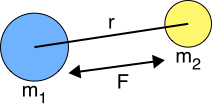
The formula is \[ F = \frac{Gm_1m_2}{||r||^2} \hat{r}\] The big picture here is that the force depends on the distance between the objects and it falls off following the inverse square law
\(G\) is the gravitational constant, which is approximately \(6.674 \times 10^{-11}\), but we can make it any number that works for us.