Challenge Four [optional]
Goals
In this challenge, you should be able to demonstrate the following:
- Knowledge of Bezier curves
- Ability to construct a shape using
curveVertex
You are on break, and because of the snags I ran into, I got it to you late. I am not going to hold you to completing this.
So why post it at all?
- I think there is some value to this exercise in understanding curves
- You may want to use some piece of this in a later piece
- You may want to be able to make something over break
Getting Started
- Accept the assignment from Classroom 50
- Clone the repository GitHub classroom creates to your local computer (in your shell, type
git cloneand the address of the repository)
I have noticed that Classroom 50 adds a lot of noise to the name of your repositories which make it difficult to figure out which sketch is which from a file browser.
You can rename the directory without breaking anything, and I suggest that you do so.
git even provides you a way to do this at the moment when you clone the repository:
git clone <repo address> <new name>Objective
This challenge is more of a technical one than the previous challenges. I welcome creative additions, but I am presenting this as purely a technical challenge.
The goal is to make something like this:
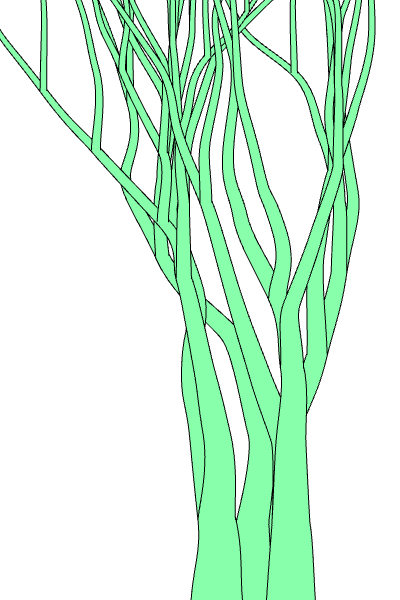
I have provided you with more of a head start than usual on this one. In setup() you will find code that populates an array called vines.
Each vine in vines an array of objects with five fields. Each object represents one anchor point of the vine.
x- the X coordinate of the pointy- the Y coordinate of the pointthickness- the thickness of the vine at this pointangle- the angle of the control pointr- the distance to the control point
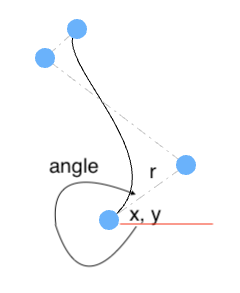
In the picture, the angle is approximately 300 degrees.
You will note that we are storing a single angle for each point, though as you saw in class, when we piece together Bezier curves, we will end up with two control points for each anchor. We are going to preserve \(C_1\) continuity, so we are going to mirror the control point 180 degrees around so that the two control points and the anchor make a straight line.
If we wanted a single pen stroke for each vine, we could use the provided information to figure out the control points with some trig (same formula as our circle drawing) and use bezierVertex to draw it. But we want the vine to have some thickness. That means we have to somehow trace up one side of the curve, offset in one direction, and then come down the other side, offset in the opposite direction.
Technical details
The key to adding the thickness is the realization that we want to thickness to be applied perpendicular to the line, and the line is turning all over the place.
strokeWeight?
We could, but we lose control of the the thickness when we do that. We don’t have a way to gradually change it.
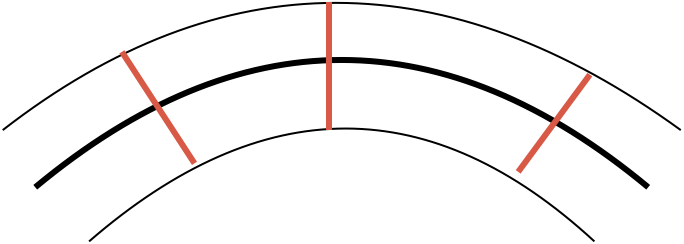
Here is the process:
- walk along the curve
- at regular intervals, find the perpendicular of the line
- use the perpendicular and the thickness at that point to generate a point
We will walk up the curve from bottom to top, and then come back down the other side with the inverse of the thickness to form a complete skin. Interestingly, despite having two different ways to draw Bezier curves, we are not going to use them. We can just iterate through our points with beginShape. We can actually use curveVertex to keep the skin curved.
Technical details
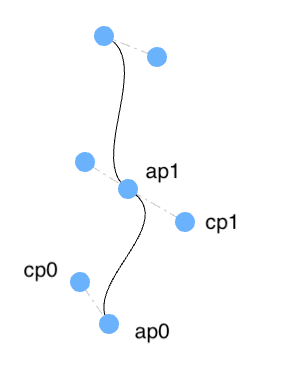
I recommend starting with a single segment (two points on the vine). The two points are the anchor points (ap0 and ap1).
For the first control point (cp0), use the angle, r, and position information from ap0 with the circle equation to get the location of the control point. The second control point (cp1) can be gotten from ap1 in a similar fashion. There is one wrinkle – the angle we have is for the control point on the other side of ap1 (picture the next segment to be processed as having ap1 as the first point). Since we want to maintain \(C_1\) continuity, we need to make sure that the two anchor points make a line with ap1. We can do that by adding 180 degrees to the angle.
Once we have those four points, we can break out two new functions I didn’t show you in class called bezierPoint and bezierTangent.
The bezierPoint function allows us to calculate coordinates along the Bezier curve. We call the function like we did the bezier() function, but we only do one axis at a time. The last coordinate is a value between 0 and 1. When we use 0, we are at ap0 and when we set the value to 1, we are at ap1.
const px = bezierPoint(a0.x, cp0.x, cp1.x, a1.x, t);
const py = bezierPoint(a0.y, cp0.y, cp1.y, a1.y, t);
These two calls give us the position on the curve based on t.
The bezierTangent function work exactly the same way, but instead of returning the spatial position, it returns the tangent to the line at that point.
The last piece we need is the normal vector (the vector perpendicular to the line at this point), which we can get from the tangent. If the tangent is (tx, ty), then the normal vector is (-ty, tx).
Putting all of that together,
- create the two control points
- loop on
tfrom 0 to 1, for each value oft:- compute the tangent with
bezierTangent - normalize the tangent
- make the normal vector from the tangent
- figure out the thickness for this value of
tby usinglerpand the thickness at each point - multiple the thickness by the normal vector to get the displacement
- compute the point with
bezierVector - add the displacement to the point to get the point on the “skin”
- compute the tangent with
What is “normalize”
If you aren’t used to working with vectors, you may not be familiar with “normalizing”. Normalizing a vector means to reduce its magnitude to have length 1. This means that the vector can be considered to be pure direction with no magnitude information.
This process will generate a sequence of points tracing up the outside of the curve. Use curveVertex to connect them. You will run through each segment in turn and then turn around and do the same thing in reverse and with negative displacement to generate the points on the other side.
Requirements
- Draws the vines with the appropriate thickness
Thoughts
There are a lot of details to manage here, so I recommend some good programming practices (i.e., use some abstraction). Create a function that handles a single segment so you can really focus on just a single Bezier segment. Note that it could issue curveVertex calls with the assumption that beginShape and endShape will be called in the appropriate places outside of the function. This is essential if you are chaining together more than one segment.
Start small. Get your code working for one segment of one vine. Then expand out to multiple segments. Then, once that is working, uncomment the code that adds branches and other vines.
Sometimes, the output will be a little ugly. The random values in there sometimes put too much of a kink in the joints. That’s okay – just reload the page (this is what curation is about).
I didn’t add a “do something creative” requirement. That is not a restriction – it is just not a requirement. I’m just acknowledging this is an optional exercise and the technical side is a little challenging. You are absolutely encouraged to be creative here. Transform this technique into some other form, tinker with the random generation, add some leaves and flowers, whatever you want.
Reflection
I would like you to write a brief reflection in the reflection.md file. It should answer the following questions:
- Do you think it is complete?
- If not, what is left to go and how are you going to address it?
- What design decisions did you make and why?
- What was the hardest part?
- What, if anything, have you gained by completing this challenge?
- What questions (if any) do you have about this assignment?
Revisions
If you revise your submission, please add a dated addition to your reflection that describes what has been changed.
Submitting
When you are ready to submit,
- Add and commit your changes and push those commit(s) to GitHub.
- Submit your repository to Gradescope (you can submit as often as you like up to the deadline)