Lecture 08 - Geometric Transformation
Today we are going to talk a little bit about geometric transformation. As hopefully you realize, this is pretty much just math.
Basic translations
translate
Command: translate(x, y)
Translation is just moving things around. It really is as simple as adding some fixed offset to all points of our shapes. If you think about our color wheel, that is essentially what we did to every point. We translated the wheel to the middle of the canvas so we could see it.
If we imagine a unit square around the origin, we would translate it to point(x,y) by adding (x,y) to all of the corners, and it would now be a square around point (x,y)
In p5.js, we have a function called translate(x,y) that does this for us
Like fill and stroke, it is state based – we issue it and then everything we draw afterwards is translated \[P'_x = P_x + x\] \[P'_y = P_y + y\]
function translateExample(){
  fill("red");
  circle(80, 80, 80);

  translate(80, 80);
  fill("blue");
  circle(0, 0, 40);
}
Scale
Command: scale(sx, sy)
This behaves as if we multiplied every coordinate by the scale factor
\[P'_x = s_xP_x\] \[P'_y = s_yP_y\]
function scaleExample(){
  fill('red');
  rect(0, 0, 100, 75);

  scale(2,2);
  fill("blue");
  rect(0, 75, 100, 75); // manually moved so they don't overlap
}
What happens when we change y to 1. The rect gets smaller AND it changes position. Why?
Rotate
Command: rotate(angle)
This one is a little hard to wrap your head around at first – it is a rotation around the origin. We can start by thinking about what this does to a single point.
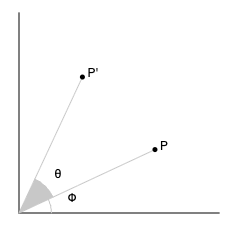
Think about the original point in polar coordinates \[P_x = R\cos(\phi)\] \[P_y = R\sin(\phi)\]
We can do the same for our new point’s \(x\) coordinate. \[P_{x}' = R\cos(\phi + \theta)\] Apply a trig identify… \[P_{x}' = R(\sin(\phi)\sin(\theta) - \cos(\phi)\cos(\theta)) = R\sin(\phi)\sin(\theta) - R\cos(\phi)\cos(\theta)\] And substitute our original point’s equations for \(x\) and \(y\) \[P'_x = P_x\cos(θ) - P_y\sin(θ)\] Now for the \(y\) coordinate.
\[P_{y}' = R\sin(\phi + \theta)\] \[P_{x}' = R(\cos(\phi)\sin(\theta) + \sin(\phi)\cos(\theta)) = R\cos(\phi)\sin(\theta) + R\sin(\phi)\cos(\theta)\] \[P'_y = P_x\sin(θ) + P_y\cos(θ)\]
So, when we rotate point \(P\) by \(\theta\), the new point will be at \[P'_x = P_x\cos(θ) - P_y\sin(θ)\] \[P'_y = P_x\sin(θ) + P_y\cos(θ)\]
This formula will be applied to all points in our shapes
function rotateExample(){
  angleMode(DEGREES);
  fill('red');
  rect(200, 200, 125, 100);

  rotate(45);
  fill('blue');
  rect(200, 200, 125, 100);
}
Shear
shearX(angle) shearY(angle)
function shearExample(){
angleMode(DEGREES);
  fill('red');
  shearX(45);
  rect(0,0,125,100);
}
\[P'_x = Px + P_y\tan(\theta)\] \[P'_y = P_y\]
These skew shapes about the axis by the angle while preserving the area. I’ll let you experiment with those (they are less fundamentally useful, and I honestly never use them)
Coordinate systems
I find the most useful way to think of this is that we have moved the coordinate frame
If we are drawing complex objects, it is usually easier to draw these centered on the origin Using this mode of thinking, we can translate to where they should be, and then draw around the origin
This also leads us to write more reusable code. While we can instrument our shapes with lots of xs and ys , this becomes a pain as shapes become more complex. If we draw our shapes with respect to 0,0 and then just translate, the code becomes much easier to understand
Thinking in these terms, how would we spin an object about its center? - Translate to the object’s location - Rotate the coordinate system - Draw the shape centered on the origin
let angle = 0;
function setup() {
    createCanvas(640, 480);
    // noLoop();
    rectMode(CENTER);
}
function draw() {
    background(255);
    fill('red');
    rect(0,0,100,75);
    translate(100,100);
    rotate(angle);
    fill('blue');
    rect(0,0,100,75);
    angle += 0.01;
}
Another cute trick: how would we get the mathematical coordinate system (centered, y up, x to the right)? - Translate to the middle - scale(1,-1)
translate(width/2, height/2);
scale(1,-1);

stroke("blue")
line(0,200,0,-200);

stroke("red");
line(200,0,-200,0);

stroke("black");

fill("red");
circle(100,100,50);

fill("green");
circle(100,-100,50);

fill("blue");
circle(-100,100,50);

fill("yellow");
circle(-100,-100,50);
What we are doing is composing transformations. This allows us to draw complex objects where objects are placed in relation to other objects. Think of the difficulty of figuring out how to attach a hand on the end of an arm doing the math by hand. By composing transformations, we can hold everything together relatively
Transformation state
the downside of the fact that transformations are composed is that when we apply a transformation it is just added to all of the transformations that have come before
we can write new transformations that “undo” earlier ones (e.g., if we previously rotated forward 30 degrees, we can rotate back by the 30 degrees to undo it). - this means we have to keep track of every value (and will make making changes later a nightmare) - this is also onerous if we have a long sequence of transformations to back out of
p5.js (and most graphics tools) provide us with a better way
they maintain a stack for storing transformation state - we have push() that adds the current state to the stack - and pop() which removes the last pushed transformation state and restores it
As a side note, push/pop operate on all state including fill and stroke etc…
Unless we are doing something very simple, the general rule of thumb is to push before you perform a transformation and pop when you are done
The draw function automatically pushes and pops at its start and end, but it is good practice to always use push and pop around transformations
let rotateAngle = 0;

function setup() {
    createCanvas(600, 600);
    angleMode(DEGREES);

}

function drawArm(c) {
    fill(c);
    push();
    rotate(-45);
    rect(0, 0, 150, 25);
    translate(150, 0);
    rotate(45);
    rect(0, 0, 150, 25);
    pop();
}


function draw() {
    background(255);
    push()
    translate(width / 2, height / 2);
    rotate(rotateAngle);
    rotateAngle += 1;

    drawArm("red");
    scale(-1, 1);
    drawArm("blue");

    pop();
}