Challenge Three
| Deliverable | Due Date |
|---|---|
| Challenge 03 | 2026-10-08T14:15 |
| Challenge 03 (revision) | 2026-10-19T23:59 |
Goals
In this challenge, you should be able to demonstrate the following:
- Demonstrate you can use
noisein a meaningful way - Have control over color
- Can implement a circle packing algorithm
Getting Started
- Accept the assignment from Classroom 50
- Clone the repository GitHub classroom creates to your local computer (in your shell, type
git cloneand the address of the repository)
I have noticed that Classroom 50 adds a lot of noise to the name of your repositories which make it difficult to figure out which sketch is which from a file browser.
You can rename the directory without breaking anything, and I suggest that you do so.
git even provides you a way to do this at the moment when you clone the repository:
git clone <repo address> <new name>Objective
This challenge is also all about randomness, intentionality, and circles, but in a very different way.
You goal is to produce something akin to this:
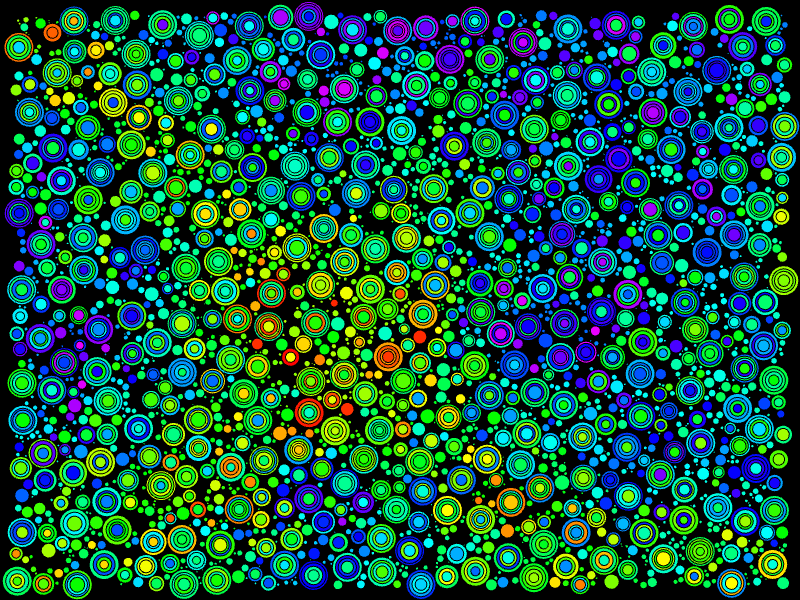
You version does not need to be a perfect copy of this. I would like you to exercise your creativity. However, it should demonstrate the features listed in the requirements.
Requirements
- The primary visual element should be nested circles
- The sketch must use circle packing to lay out the circles
- Color must be derived from a noise field in an intentional way (I should be able to see the impact of the noise in the output AND you need to make your choices should be justified)
- Your submission must include 3-5 curated outputs of your sketch
Thoughts
nested circles
Creating nested circles is not enormously difficult. As you did for the imperfect circle, I encourage you to begin with a function that abstracts away the details of creating the circle so you can draw nested circles with one command.
color from a noise field
When you have different colors being generated, it can be difficult to see how the noise is working. I suggest either using my example or just writing a quick loop that colors in the whole screen with the noise values as a way to tune the scale you want to work at.
circle packing
The heart of this piece is going to be the circle packing. There are a variety of circle packing algorithms, but I’ll provide you with a basic one to get you started.
In broad strokes, the idea is to randomly generate circles and then make sure it doesn’t overlap any other circles you have already created.
So, for each circle you create, you will follow these steps:
- Generate a random point on the canvas
- Establish an initial radius
- Iterate over all circles
- if the distance between the center of the circle and your point is
greaterless than the sum of the circle’s radius and the new radius, reduce the new radius so the sum of the radii is the same as the distance between the points - if the new radius is zero of less, throw it away and start over
- if the distance between the center of the circle and your point is
- add the new point and radius to your list of circles
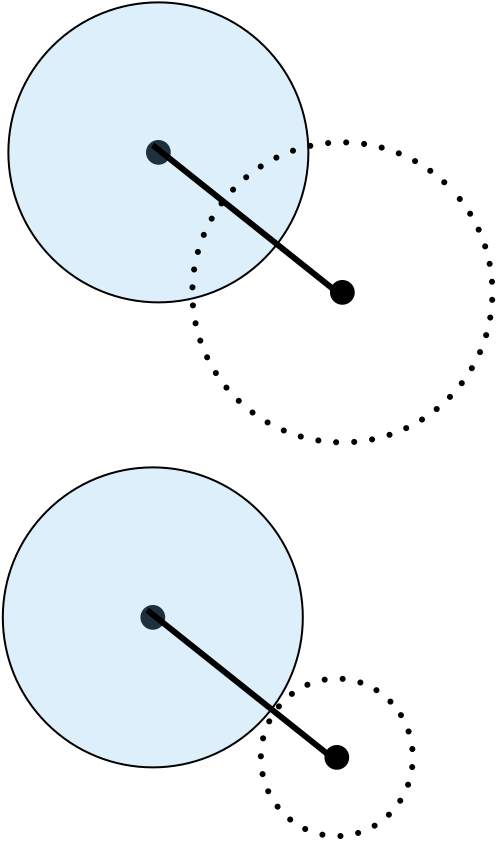
Part of the challenge here is representing your circles. You could create a class as you did for the noise tutorial.
I find for instances like this I just create object literals, which look like dictionaries in Python.
Calculating the distance isn’t hard if you know your Pythagorean Theorem. However, p5js has your back with two functions for performing the calculation.
dist- use this if you just have raw valuesp5.Vector.dist()- use this if you are storing your positions asVectorobjects
It may strike you that this algorithm is terribly inefficient. The algorithm is \(O(n^2)\) since we have to check every circle for every other circle. There are some spatial data structures that help us not to check circles that are no where near our candidate point. However, that would add some considerable complexity and the naïve approach runs relatively quickly for the number of circles we are generating.
Reflection
I would like you to write a brief reflection in the reflection.md file. It should answer the following questions:
- Do you think it is complete?
- If not, what is left to go and how are you going to address it?
- What design decisions did you make and why?
- What was the hardest part?
- What, if anything, have you gained by completing this challenge?
- What questions (if any) do you have about this assignment?
Revisions
If you revise your submission, please add a dated addition to your reflection that describes what has been changed.
Submitting
When you are ready to submit,
- Add and commit your changes and push those commit(s) to GitHub.
- Submit your repository to Gradescope (you can submit as often as you like up to the deadline)