Lecture 10 - Curves
Arcs
We have an arc() function
arc(x,y,w,h,start,end,[mode], [detail])x,y: position of the arcw,h: size of the arc (works like ellipse)start: angle to start the arcend: angle to end onmode: how to finish the arc- unspecified:
PIE, but without lines (DEFAULT) CHORD:draw a straight line to close the shapePIE: connect lines back to the centerOPEN: don’t connect the ends (fill will followCHORD)
- unspecified:
detail: only used by WebGL mode to specify the number of points to draw around the arc
example: remaking the color wheel
const NUM_SLICES = 50;
let sliceSlider;

function setup() {
  createCanvas(600, 600);
  // noLoop();
  noStroke();
  colorMode(HSB, TWO_PI, 100, 100);
  sliceSlider = createSlider(3, 200, NUM_SLICES, 1);
  sliceSlider.position(10, height + 10);
}

function draw() {
  background('white');

  const slices = sliceSlider.value();
  const cx = width / 2;
  const cy = height / 2;
  const offset = TWO_PI / slices;

  for (let angle = 0; angle < TWO_PI+0.1; angle+=offset){
    fill(angle , 100, 100);
    arc(cx, cy, width - 20, height - 20, angle, angle + offset);
  }
}
example: making a pie chart
function setup() {
  createCanvas(600, 600);
  angleMode(DEGREES);
  colorMode(HSB, 360, 100, 100);
  noLoop();
}

function draw() {
  background("#fafafa");

  pieChart([5, 2, 4, 10, 7], 200, 200, 200);
}

function pieChart(data, x, y, size) {
  const total = data.reduce((a, b) => a + b, 0);
  const colorOffset = 360 / data.length;

  let current = 0;
  data.forEach((d, i) => {
    const angle = (d / total) * 360;
    fill(colorOffset * i, 100, 100);

    arc(x, y, size, size, current, current + angle, PIE);
    current += angle;
  });
}
Curves
p5.js provides a couple of different ways to create curves
in general, however, it provides two main approaches: Bezier Curves and Catmull-Rom splines
these follow the two primary approaches to curve generation: interpolation and approximation - interpolation tries to find a smooth path through all of the points - approximation doesn’t go through all of the points
in both cases, there is a stand alone function for generating a simple curve, or we can use it within beginShape() and endShape()
Bezier curves
The Bezier curve is a hybrid - interpolates the end control points and approximates the others
With three points, we can think of this as three simultaneous interpolations At time t, \[
A(t) = (1-t)P_0 + tP_1
\] \[
B(t) = (1-t)P_1 + tP_2
\] \[
P(t) = (1-t)A + tB
\]
This makes the quadratic \[ P(t) = (1-t)^2P_0 + 2t(1-t)P_1 + t^2P_2 \]
We draw the curve by iterating through values of \(P(t)\)
Note that this means that we have two anchor points (points that the curve moves through) and one control point (a point that controls the shape but is not touched by the curve)
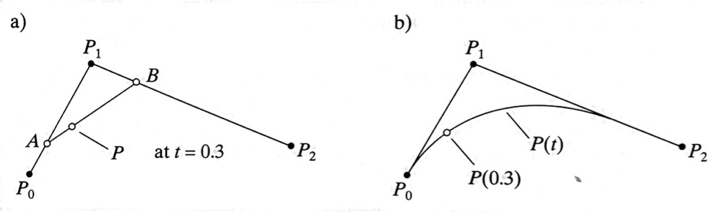
With four points, we extend this out even further to get a cubic polynomial, but follows the same form. This time we have two anchors and two controls
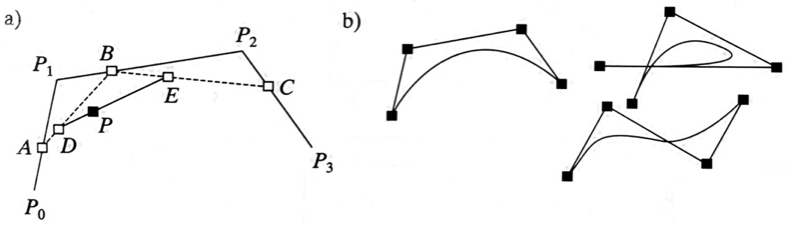
images from “Computer Graphics using OpenGL” by F.S. Hill, Jr.
bezier()
The bezier() function uses the four point form
It takes eight arguments, which are the x and y coordinates of the - first anchor point - first control point - second control point - second anchor point
Note that if the second control point is the same as the second anchor point, we have a three point Bezier.
Curve
p5.js can also make Catmull-Rom splines aside, Ed Catmull is one of the co-founders of Pixar
Catmull-Rom splines are interpolated curves – the curve goes through all of the control points (other than the first and last)
Unlike the Bezier curve, it does not fit within the convex hull of its control points. They can also form weird loops if the points are tight together
curve()
like the bezier curve, this takes eight arguments - first control point - first point - second point - second control point
More complex curves
What happens if we want a more complex curve? The bezier() and curve() functions aren’t going to let us just add more points.
There is a second way to make curves by enclosing vertices between beginShape() and endShape(), just like our polygons. Note that we cannot pass any arguments to beginShape() when we are making curves.
curveVertex()
To make a Catmull-Rom spline, we have a curveVertex(x,y) function.
There needs to be a minimum of four points. It will draw the curve between points 2 and 3, using 1 and 4 as the control points (just like the curve() function). Adding more points extends the curve, with the first and last points acting as the control points with all of the points in between falling on the curve.
bezierVertex()
Using bezierVertex is a little more complex. In order to understand why, we need to think about what adding points means. Somewhat simplistically, Bezier curves are the opposite of the Catmull-Rom splines. For the splines, the first and last points are control points, and the rest of the points are anchors (this is simplistic because we don’t have anchor points in the same way – they are interpolated points on the curve which serve both as points on the curve and control for it).
For Beziers, the first and last points are anchors, and the rest of the points are control points. So, to create more complex curves, we are adding to the number of control points. This makes the math very complex (a lot of interpolations). It also makes control very difficult. Moving one control point will change the whole curve, so we don’t have local control.
Piecewise construction
The solution is to build the curve in pieces. Each call to bezierVertex creates one segment
bezierVertex(x1, y1, x2, y2, x3, y3)- the first anchor is the last anchor point in the shape before this call
(x1, y1)&(x2, y2)are the control points(x3, y3)is the second anchor point
Because this relies on there being a previous point to act as anchor, we need at least one call to vertex() before the first call of bezierVertex
There are three levels of continuity we worry about when piecing together curves
The connection point is called the knot. There are three levels of continuity that we can get at the knot
- \(C^0\) continuity
- the segments meet with no gaps
- this is easy to guarantee
- \(C^1\) continuity
- the first derivative is also \(C^0\) continuous
- there are no corners and the normals/tangents of the line are continuous
- \(C^2\) continuity
- the second derivative is also continuous
- the tangents and normals are \(C^1\) continuous
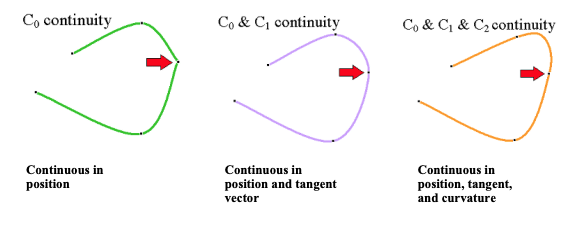
\(C^0\) is easy – just make the lines connect. This is what we get with our piecewise Bezier
\(C^1\) is what we are guaranteed by the Catmull-Rom spline. We can make our piecewise curve do this if we make sure that the point at the knot and the two control points on either side are co-linear.
\(C^2\) is more difficult
Which to use?
If we are primarily concerned with making a line that smoothly moves through a set of points, then the spline is the right pick.
If we want to have more local control, curves that fit within a fixed region, or slightly nicer looking curves, then we would probably want to use the Bezier curve. We do have to work harder to get that \(C^1\) continuity. This is why many tools (like Illustrator) that provide curve editing tools force the control points to move together in a line with the shared anchor point.