Challenge One
| Deliverable | Due Date |
|---|---|
| Challenge 01 | 2026-09-24T14:15 |
| Challenge 01 (revision) | 2026-10-09:23:59 |
Goals
In this challenge, you should be able to demonstrate the following:
- You know enough git to clone a repository and submit your work
- You can create a basic sketch
- You understand the basics of the p5.js coordinate system
- You can analyze a simple composition and reproduce it
Objective
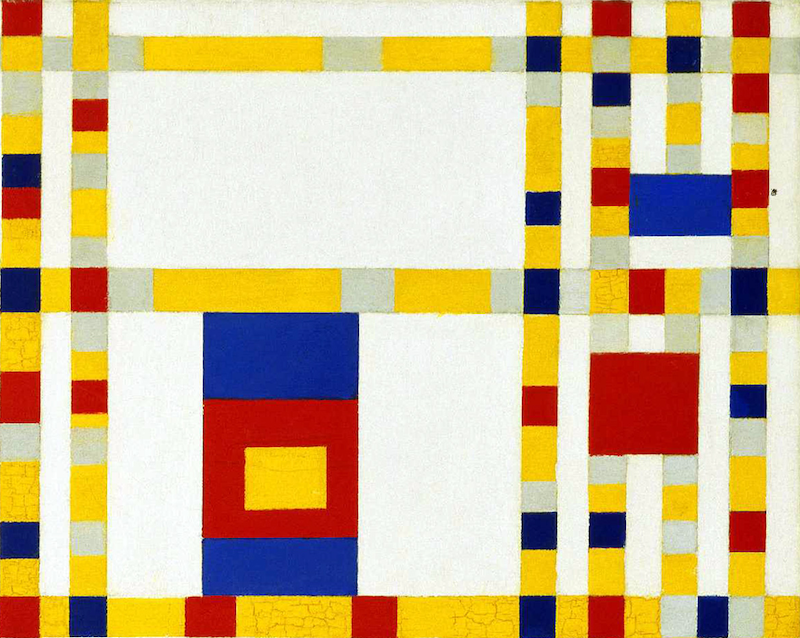
Your first challenge is to reproduce a detail of “Broadway Boogie Woogie” by Piet Mondrian.
Getting Started
We will be using git and GitHub this semester to manage your homework. If you are not familiar with git, I recommend that you spend a few minutes reading through the basic introduction to git document I wrote. If you have any questions, ask early and often.
You will need a GitHub account, so make sure you have one before you start.
- Accept the assignment from Classroom 50
- Clone the repository GitHub classroom creates to your local computer (in your shell, type
git cloneand the address of the repository)
Developing
My recommendation is that you work locally using VSCode. There is nothing magic about VSCode, it is just a reasonable text editor with a couple of handy plugins.
I find it helpful to open the whole folder in VSCode rather than individual files. This allows me to quickly switch between files and the integrated terminal opens in a sane location (with the working directory set to the folder).
One of the key advantages of using VSCode is the Live Server extension which I recommend you install. It puts a little “Go Live” button in the footer of the window, and you can click it to start a web server rooted in your project’s folder.
Requirements
- Your version should be as close to the above as possible. It will be tempting to create “inspired by” versions (it is not an unusual coding project itself, but not what we are doing). If you get inspired – make a sketch. Most challenges will have a creative component, but not this one.
- Match the colors as best you can, though we have to acknowledge that Mondrian’s is painted, so you have a combination of variations in the paint and lighting on the photograph to contend with. Try to get close though. In its ideal form, the piece only has six colors, so you can do that as well.
- The dimensions of the detail are 800 x 636, which I have initialized in the sketch for you. Do not change these.
Thoughts
Mechanically, this is a lot of rectangles. There is no getting around that. There are some opportunities to create some simple abstractions to help make your code easier to write and debug.
A tool for examining color on your screen will be useful for this assignment (and for others as well). I use ColorSurp on my Mac, which also has a collection of other color tools. I have not used any tools on other platforms, but Gpick on Linux and the Color Picker in PowerToys seem to offer similar capabilities.
There are a lot of details with respect to rectangle placement. Being slow and methodical instead of making a lot of guessing will pay off. I suggest printing the detail and writing common dimensions on it. A ruler and conversion factor could work. I used selections in Preview on the Mac to get actual pixel dimensions. Any sort of tool that will tell you dimensions of regions on your screen could do the same.
Reflection
I would like you to write a brief reflection in the reflection.md file. It should answer the following questions:
- Do you think it is complete?
- If not, what is left to go and how are you going to address it?
- What was the hardest part?
- What, if anything, have you gained by completing this challenge?
- What questions (if any) do you have about this assignment?
Revisions
If you revise your submission, please add a dated addition to your reflection that describes what has been changed.
Submitting
When you are ready to submit,
- Add and commit your changes and push those commit(s) to GitHub.
- Submit your repository to Gradescope