Lecture 34 - Caches I
Goals
- learn how a cache works
Stats for my computer To find the cache sizes on the computer I used sysctl hw|grep cache
| tech | access time | $/GB | in laptop |
|---|---|---|---|
| SRAM | 0.5-2.5ns | $1500 | ~30.25 MB |
| DRAM | 50-70ns | $25 | 32 GB |
| SSD | 80,000 ns | $0.40 | 1 TB |
| HD | 9,000,000 ns | $0.02 | 4 TB (not in the computer) |
Time comparison You are working in the kitchen area and you have a question…
- The answer is in your notes right in front of you
- we will call this SRAM
- say this is 10 seconds – this gives us a conversion factor of 1ns computer time <=> 10 seconds human time
- DRAM equivalent?
- 70ns, so 10 * 70 = 700 seconds, roughly 12 minutes
- you walk down the hall and ask me
- SSD equivalent?
- 80,000ns, so 80,000 * 10=800,000 seconds or about 9.25 days
- you have time to book a flight to England and go ask a professor at Cambridge in person (and have some time left over for sightseeing)
- HD equivalent?
- 9,000,000ns, so 9000000 * 10 = 90,000,000s, or 25,000 hours, 1041.6 days, 2.85 years
- you have time to go get a Master’s degree in the subject
- cloud equivalent (local region)?
- 20,000,000ns => 202,222,220s or ~56,172 hours, 2340 days, 6.4 years
- you can get a Ph.D. in the subject
- cloud equivalent (European region)?
- 150,000,000ns => 1,500,000,000s or ~ 416,666 hours, 17,361 days, 47.5 years
- get a Ph.D and spend your career as a professor
Note that these numbers are a little misleading because once we found the data, we can read out a very large chunk at one time… but then you will probably answer a bunch of other questions while you are doing your Master’s/Ph.D./career, so the comparison is still fair.
Working set theory
Denning proposed something called the “working set model”
This is based on the idea of the locality of reference - memory references in a program tend to cluster temporally and spatially - example: loops and functions - the cluster of instructions will change, but slowly, so we can consider most memory accesses to be local
The two kinds of locality - temporal locality - if we reference something, we will probably reference it again soon - loops revisit the same instructions - variables are an obvious example - spatial locality - if we access and address, we are likely to access something near it - the next instruction or the next element of an array, or the next property of a struct
The theory is that if we can take these clusters, or “working sets” and put them in fast memory, we will be able to work faster. We can move working sets up and down out hierarchy of memory, swapping them for things in slower memory.
Example: - You are sitting the library doing research on the correlation between the cost of pumpernickel and the perceptions of class divisions. - You grab a few books and start reading - you realize that you have nothing that covers the price of pumpernickel in Edwardian England, which is essential, so you get up and find another book - after you do this a few times, you have a good collection of books and you won’t need to get up for a while - from your perspective you now have the entire contents of the library on your desk, because you have everything you need, and accessing the information is now much faster because it is all local
We can use the same principle to make main memory seem fast and relatively infinite
Caches
We are going to use this idea to speed up our operations.
We will introduce a smaller, faster piece of memory between the processor and main memory, which we will call the cache.
When the processor needs something from memory, it will check if the cache already has it (this is called cache hit)
if the cache doesn’t (a cache miss), then it will go out to memory for it
While it is there, acknowledging the spatial locality, it will grab a bunch of other nearby data at the same time.
So the cache support both temporal and spatial locality - values that we have used will be close by in fast memory if we need them again soon - when we grab data from slower memory, we take the opportunity to grab a good sized chunk (we will call this a block)
This principle can actually be applied in multiple layers, with each progressive level just a little bit larger and a little bit slower
Modern systems frequently have several levels of cache, called L1, L2, … When I described the SRAM in my computer, I was summing up all of the various pieces of cache.
Let’s take a quick moment to look at how the cache affects access time.
Assume we have two levels of memory - L1 1000 words and an access time of .01μs - L2 100,000 words and an access time of .05μs
When we can find our data in L1, that is a hit
When we can’t, that is a miss. There are several kinds of misses - cold miss - the cache is just empty - capacity miss - the working set is larger than the cache - conflict miss - there is room in the cache, but only one place our data could be, and that is occupied
- The hit rate is the the percentage of operations that can be satisfied by L1
- The miss penalty is what happens when we can’t find the value.
- we looked in L1
- fetch from L2
- load it into L1
- fetch it from L1
So, our average access rate will be
\[ 0.01 \times hitRate + ((.01 + .05) \times (1 - hitRate)) \]
- with a 90% hit rate \[ 0.01 \times .9 + ((.01 + .05) \times (.1)) = .009 + .006 = .015\micro s \]
- with a 50% hit rate \[ 0.01 \times .5 + ((.01 + .05) \times (.5)) = .005 + .03 = .035\micro s \]
So that comes out to be more than twice as slow but it is still faster than if all of our accesses where made directly to L2.
Caches are an important outside of the processor as well. The cache you are potentially the most familiar with is the browser cache. You browser hangs on to copies of websites it visits. if you ask for the same page again, it can ask the remote server if there has been changes, and if there aren’t, then it can serve the local copy, which will be much faster (even for our slow human processing speed).
Example
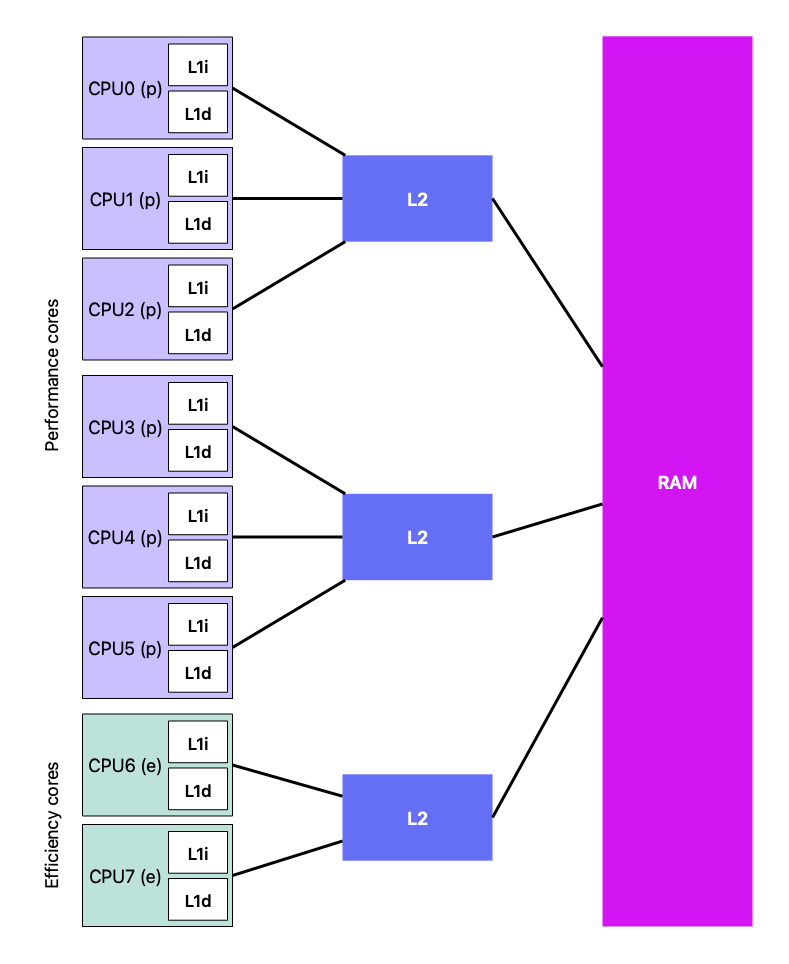
To get more specific about my laptop, the cache is listed as:
Performance Cores (perflevel0 - The “Fast” cores)
- L1 Instruction Cache: \(192\) KB (\(196,608 / 1,024\)) per core
- L1 Data Cache: \(128\) KB (\(131,072 / 1,024\)) per core
- L2 Cache: 12 MB (\(12,582,912 / 1,024^2\)) per three cores
Efficiency Cores (perflevel1 - The “Slower/Saving” cores)
- L1 Instruction Cache: \(128\) KB (\(131,072 / 1,024\)) per core
- L1 Data Cache: \(64\) KB (\(65,536 / 1,024\)) per core
- L2 Cache: 4 MB (\(4,194,304 / 1,024^2\)) shared
There are a couple of things to unpack here.
First, the computer has two cache levels. So we have some good size L2 caches, followed by some much smaller L1 caches.
The L1 caches are divided up into instruction and data. This is what gives us our hybrid Harvard architecture. The RAM is unified so we don’t end up with big chunks we can’t use. But, when we get closer to the processor, we split into data and instruction streams which have parallel access channels to the processor.
The last thing to notice is that we have two different types of cores.
We have been taking about the computer as if it had a single processor, which historically was the case. As we have been able to make components smaller and smaller, at a certain point it was no longer practical to just make the processor faster (physics got involved). So, what we started to do was to use the freed up room to add additional processor “cores”.
My laptop has 8 cores. But the story doesn’t end there. Apple’s Silicon chips have a heterogeneous architecture. Most previous chips have had homogeneous cores – they are all the same. To get high performance and good battery life, Apple has divided the cores up into performance cores and efficiency cores. The performance cores have big beefy caches because they are intended to work fast and hoover up data. The efficiency cores run slower and more efficiently and have smaller caches since the time differential isn’t as great and they aren’t intended for big data crunching.
Mechanical level
vocabulary
- locality of reference
Skills