pete > courses > CS 315 Fall 26 > lecture 01
Lecture 01
Goals
- describe the difference between a program and a process
- describe the purpose of the operating system
- describe the purpose of system calls
- explain why most programs don’t use system calls directly
administrivia
introductions
who is not officially enrolled (yet) ?
lecture time for lecture
lab time for lecture spillover, hands-on tasks supporting coursework, workshop time
review coursework:
- 7 assignments + project
- fully compete certain number to earn certain grade (details on course website)
strongly suggest work in pairs
if you want a partner but don’t have one, email me before Thursday afternoon lab and I will arrange partnerships among those who want them
no official deadlines except the last day of finals week
procrastinators will have a busy time at the end of the semester
course notes online
preface: all coursework will be done in Linux
I’m assuming all of you have at least been exposed to it, so I’m not going to introduce it formally
I will discuss the commands I use the first time I use them
and I’ve written some guidance here
plus you’ve got the Internet
and you can always ask me questions (in person or by email)
like architecture, while this class will hopefully answer many questions, it will also raise more
please ask if you have questions, but I may defer answering to office hours or other courses (most likely Operating Systems, to be offered this coming spring, or Networks, expected to be offered the following spring)
also, there are a couple weeks at the end of the semester that are currently (and intentionally) unplanned: we can cover some outside-the-bounds topics then
first, a review of CSCI 1xx
in which you wrote some source code in Python or NetLogo, pressed the magical green button and it ran
+-------+   run     +-------+
|  src  |---------> |       |
+-------+           +-------+
next, a review of CSCI 0201
in which you wrote some source code, this time in Java, pressed a button to compile it, and then ran it
getting more complicated!
+-------+  compile  +-----------+   run     +-------+
|  src  |---------> |  program  |---------> |       |
+-------+           +-----------+           +-------+
now, a review of CSCI 0202, in which things got even more complicated
you write source code
which you then feed to compiler
which translates the source code to assembly language
which is then fed to the assembler
produces machine code (another term for which, more frequently used in systems programming contexts, is object code)
and then you can run the program
+-------+  compile  +-----------+ assemble  +-------+   run     +-------+
|  src  |---------> | assembly  |---------> | obj   |---------> |       |
+-------+           +-----------+           +-------+           +-------+
and so a program is a sequence of assembly operations
202 also presented the idea of an ALU and register file, which is what these assembly operations (encoded as machine code/object code) drive:
the register file stores data to be computed on
the ALU contains circuitry that performs operations like addition, subtraction, shifting, etc
each tick of the computer clock causes one instruction to run: inputs are read from the register file, they flow through the ALU to produce a result, and that result is then written back to the register file
except the register file is relatively small, and many programs need to work on more data than will fit in it
which, in 202, led us to the notion of computer memory, which is vastly more capacious (has more capacity: can store more data) than the register file, at the cost of being much slower to read/write that data
which in turn led to the existence of special instructions (LOAD and STORE) that transfer data between memory and the register file
memory is also used to store the instructions of the running program itself
this is all accurate: it is how modern computers work
there are more details in all of the above, but the basic ideas hold
some questions arise, however, from that view of things
I will pose some of those questions to motivate the material in this class
question 1: how does the program end up in memory and start running?
the output of the compiler/assembler is object code that we can run
the assumption is that we can keep this output around and choose to run the program whenever we want
which means that we cannot store this thing in memory (remember that memory is volatile, meaning that it forgets what it’s storing when it loses power, making it a bad place to store data that we want to access it long-term)
so we store it on disk instead, which is the traditional name for non-volatile storage (historically, spinning metal platters; more recently, electronic chips)
and so the thing on disk needs to be loaded into memory for it to run
since the thing on disk isn’t a running program, it also has no notion of run-time state: that is, since it doesn’t represent an in-progress thing, it doesn’t need all the information that describes an in-progress thing
from our view of the world in 202, this the contents of the register file and the contents of the stack and heap
remember that these collections of data indicate exactly where we are in the running program
it will help to have names for these different things: the inert thing on disk and the living, running thing in memory
a program is the inert collection of bits sitting on disk, produced by compiling and assembling (it has no state: no memory contents, no register contents)
a process is the running thing in memory, which has execution state: most notably a working data set, including the contents of registers (among which is the PC), a stack, and a heap
"running a program" produces a process
we can therefore amend our picture from before with a name in that last box:
+-------+  compile  +-----------+ assemble  +-------+   run     +---------+
|  src  |---------> | assembly  |---------> | obj   |---------> | process |
+-------+           +-----------+           +-------+           +---------+
note that a single program can be the basis for multiple processes
for example, the source code for my terminal program was compiled once, but I’ve currently got many terminal windows open
each time I open a new terminal, the same program file is loaded into memory and is used to create a new process
which leads us to…
question 2: how do multiple processes run (seemingly) simultaneously?
if I’ve got a single ALU/register file, how can all those terminal windows I’ve got open seem to be working at the same time?
there are two answers to this
first, I don’t have a single ALU/register file
instead, I’ve got many ALU/register file combos, each of which can run a single process
we call this combo a core, and the majority of processors in user computing devices these days contain multiple cores
but no matter how many cores are in a processor, it is guaranteed that somebody will come along and want to run more processes than there are cores, so this isn’t a general solution
so, second, the general solution is that a given core will run a process for a small amount of time, kick the process off, and another process is allowed to run on that core for a bit, rinse and repeat
the effect is that every process (ideally) is allowed to run and make progress, and the amount of time that each process is allowed to run is small enough (~10ms) that they appear to the user to be running simultaneously
(follow-up question: what entity is in charge of switching processes back and forth? how does it decide which process goes to which core? the operating system—more later)
question 3: so we’ve got multiple processes running at the same time; what is to prevent them from interfering with each other?
the importance of this is probably more convincing if we consider a computer running processes on behalf of a variety of users (which is pretty common these days, though less so on personal devices—much moreso in large-scale computing environments like The Cloud)
what is to prevent Process A, running on behalf of User A, from reading/writing the memory being used by Process B, running on behalf of User B? what if User B has passwords stored in that memory?
returning for a moment to assembly language/machine code: it is indeed true that (effectively) everything on a computer happens by running such code
so there is a sequence of instructions that User A could use to read the memory of Process B
and there is nothing to prevent User A from putting those instructions in a program and running it
there must be some way to disallow that, otherwise we would have utter chaos, and no such thing was hinted at in 202
question 4: but is a program really just a sequence of assembly operations?
check out hello-world.c
by compiling this, we produce the aforementioned assembly code
but there is stuff in there that isn’t assembly: namely, the strings, such as "hello world\n"
these strings must be included in the result of compilation (because they are necessary for the program to do the thing we’re directing it to do), but they aren’t instructions, they’re data
so how are data and instructions combined in the result of compilation?
they must be organized in a particular way within the file produced by the compiler
follow-up observation: the component tasked with loading that program into memory must also be able to interpret the file format produced by the compiler
all of these questions lead to the existence of the operating system, often referred to as the kernel
this is a piece of omnipotent software that (ideally) solves all our problems
it decides which process gets to run at any given time
it decides how much time that process gets to use the processor
it mediates all process accesses to make sure they don’t overstep their bounds
it takes the inert program on disk and puts it into memory, creating a process
but how?
consider a bunch of processes running on a machine: browser, music player, text editor, compiler, etc
they all want to access the hardware in some way: read from disk, write to disk, draw on the screen, receive keys typed on the keyboard, send and receive data over the network
if they all manipulate the hardware (more or less) simultaneously, without regard for the other processes, chaos will ensue
one process can read and write another process’s data or scramble their communications, etc
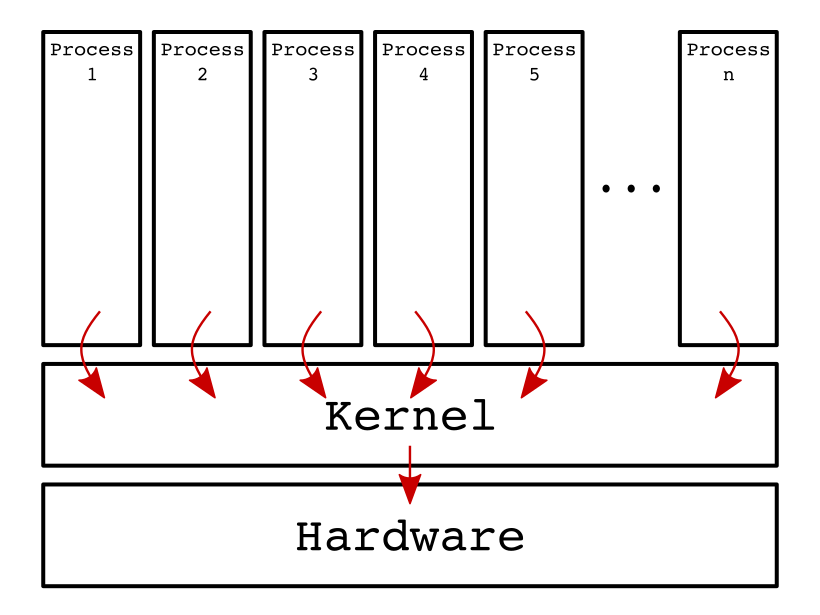
therefore, instead of directly accessing the hardware, all such requests go through the kernel
instead of a process directly talking to the disk, it must ask the kernel to perform the operation on its behalf
the kernel first checks whether the operation is allowed
if it isn’t, the operation is aborted and failure is reported to the process
otherwise, the operation is carried out and the result is reported to the process
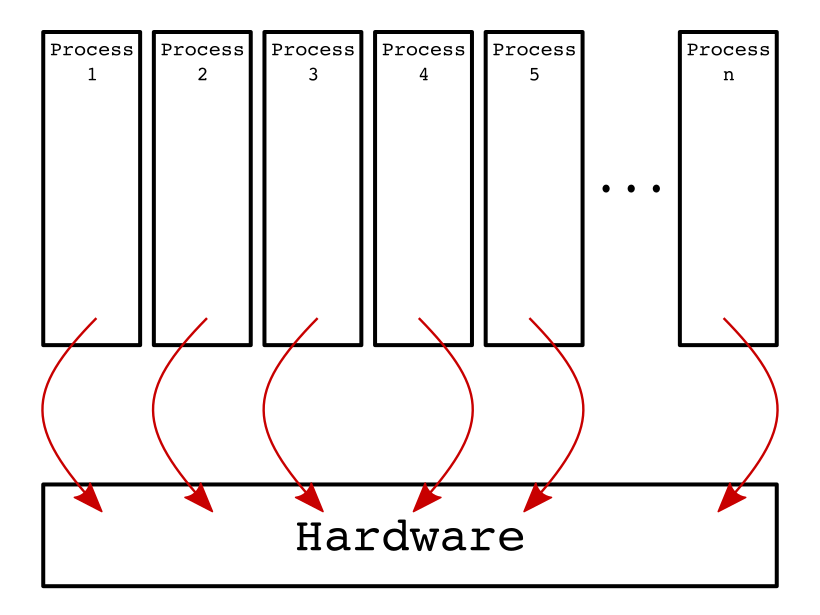
in pictorial form, we have a lot of processes competing for access to the hardware: 01-processes.png

that competition could result in interference (accidental, intentional, malicious, benign, or harmful): 02-chaos.png
so we introduce a layer of software between processes and the hardware, which we call the operating system or kernel: 03-kernel.png

when a process wants to access the hardware, it asks the kernel, which may or may not perform the operation: 04-order.png
the concept of a process asking the kernel to do something looks and feels very much like a special function call: the caller suspends its own operation while the function does its thing and then the function reports its success back to the caller, and the caller resumes
while they feel very much like functions (and, indeed, from our perspective in this course, they will look exactly like functions) they are instead called system calls
every operating system supports a collection of system calls: ie, a set of operations every process may ask the kernel to carry out on its behalf
in fact, an operating system is more or less defined by the set of system calls it supports
Linux, Windows, and OS X support different sets of system calls
this is why software compiled on, eg, Linux doesn’t work on Windows: it expects a certain set of system calls to be available and they just aren’t
(Linux and OS X are actually closely related, for reasons we will discuss later)
there is another benefit to the existence of system calls: efficiency
if a bunch of processes are all attempting to access the disk, an omniscient observer could potentially reorganize them such that they better take advantage of the underlying hardware
or so that high-priority processes get better access
what kinds of operations would probably be system calls?
opening a file? yes, because it accesses the hardware (disk) and involves permission checks
reading and writing to a file? yes, for the same reason
calculating the arc-cosine? no, because it’s "just" computation: it only involves data in memory, register file, and ALU
what about printf, the primary function for writing text output from C?
not only does it actually perform the output, but it also formats it (hence the "f"): for example, it converts numeric types like two’s-complement integers into ASCII for printing
(refer back to hello-world.c above for an example)
the interesting thing here is that conversion does not require special access, but the output does
therefore, the safest solution is for printf itself to not be a system call, but to use other system calls (like write) to only cause the output to happen
we use the term wrapper to refer to code that takes a function and surrounds it with other logic: in this case, we can think of printf as a wrapper for the system call that performs output because it takes that output syscall and embeds it within logic that performs the formatting
what we’ll see is that, in general, at least on Linux, system calls are usually very simple operations, and complexity is achieved by combining them in interesting ways, and wrapping them up in larger boxes with other logic inside
which finally gets us to the point of the course, and the definition of "systems programming"
in other courses, you’ve written software mainly for people to use directly: that is, applications
but those applications have been written on top of other software that makes things like reading from and writing to disk more efficient and convenient
in this class, we will be looking at the latter software
we will be concerned with using the system calls and building useful abstractions out of them
we will be building software, not for users to use directly, but for developers to use to themselves create bigger and better software