CS 312 - Assignment Three
Goals
- Get more practice implementing React components, including incorporating PropTypes
- Advance your understanding of the division of responsibilities and state between components
Prerequisites
This assignment builds on the work of assignment 2. As such, you should not start it until you have passed all of the tests for assignment 2. While this doesn't assure you that you will have "met expectations", it is enough to proceed.
-
Create the git repository for your practical by accepting the assignment from GitHub Classroom. This will create a new repository for you with a bare bones npm package already set up for you.
-
Clone the repository to you computer with
git clone(get the name of the repository from GitHub). -
Open up the
package.jsonfile and add your name as the author of the package and the URL of your git repository. -
Use
npm installto install the required dependencies and tools.
Once you have the dependencies installed you can start the development server with npm run dev.
Background
This assignment, the next part of creating Simplepedia, starts where assignment two left off. As with previous assignments an initial set of (failing) tests are provided as part of the skeleton (run with npm test). These tests are intended to help you as you develop your application and to ensure that the grading scripts can successfully test your assignment. Code that passes all of the provided tests is not guaranteed to be correct. However, code that fails one or more these tests does not meet the specification. You are not expected to write any additional tests for this assignment.
Assignment
The primary goal of this assignment is to add an editor so that you can add and edit articles. You will also get a taste of working in an Agile environment were requires shift subtly over time.
Part 0: Port over Assignment 2
The first thing that you need to do is to update the Assignment 3 skelton with the code you wrote for assignment 2. Be a little cautious as you do this -- there are some small changes and you don't want to just replace the files with your old ones. The most significant change you will find is that the collection is now a prop of Simplepedia instead of being state. If you take a look in _app.js you will find the data's new home.
Make sure that your code has all of the functionality from assignment 2 before proceeding. Note that some of the tests are the same, but many are testing for the new functionality and you many need to use skip and only to prune down to tests that only test the old behavior.
Part 1: Add PropTypes
Please add PropTypes to your existing modules. You will find that I have enabled the PropTypes checker in eslint and added some tests that look for them, so your code will no longer pass the linter without them.
When adding PropTypes, be as specific as possible. There are a lot of different validators. Note that these cover specifying the contents of arrays and the structure of objects and I expect you to do it. So, for example, for the Article component, don't just tell me that it is an object, tell me what fields are required. If you need to pass an Array, don't just tell the system it is an Array, tell it what to find inside.
Make sure that eslint and jest agree that you have added PropTypes for everything.
Part 2: Switch to routing (requirements change!)
As I mentioned in class, Simplepedia has a critical problem -- you can't bookmark a particular article or share a link to it. We are going to fix that with routing. (You can read about Next routing in the Next documentation, but read through everything here first).
Big Picture Every article will now have a unique URL. For example, the article on 'Pierre Desrey' will now be located at http://localhost:3000/42. Rather than storing a currentArticle as state, we will the use the URL to keep track of which article we are looking at (if any).
Dynamic routes
In class I described how we could make new .js files in pages and they would become "pages" in our single-page application. We are not going to make a new page for every single article -- that would be madness! Instead, we are going to use a facility in Next called dynamic routes. Dynamic routes are essentially matchers. They allow us to introduce variables into the route that are available to our code.
We specify a dynamic route by putting the name in square brackets. We are going to use a special form called an "optional catch all dynamic route". Don't worry too much about understanding the details here -- just try to keep up with the instructions.
Rename index.js to [[...id]].js. This will now match pretty much any path (e.g., /, /42, even /42/towel). The application should still work (you have it running in the dev server so you can see that, right?).
The id in there is a variable, and we would like to know what it is so we can display the right article. To do that, we are going to use the useRouter hook to access the React router.
- import
useRouterwithimport { useRouter } from "next/router"; - Add
const router = useRouter();to the component - access the
idvariable withconst {id} = router.query;(note the destructuring assignment)
Try console logging the id to make sure changing the URL works before moving on
Replacing currentArticle
Currently you should have a state variable called something like currentArticle (I'm going to use currentArticle in this description, but if you used a different name, keep using it to minimize the amount of code you need to touch). We need to replace both it and the setter, so comment out the `useState line that creates them.
Create a new variable of the same name. Use the id to look up the article in the collection. The find function would be a good choice. There are two things to watch out for:
- sometimes
idwill beundefined, in which case, don't bother with the look up, just set yourcurrentArticlevariable to undefined. idwill be a string, while the ids of the articles will be numbers, and they will need to be the same type if you use===
If you have done this correctly, you should be able to visit different articles by adding a / and a number to the end of the URL.
Replacing setArticle
You also need to replace the setter, which I will call setArticle (again you should continue to call it whatever you were already using).
Create a new function with the same name as your setter that takes in a single argument (the article). This will be responsible for programmatically changing the URL.
The function we will use is router.push(). We call that with the route we wish to visit. So, if we want to visit the article with the id of 42, we would call router.push("/42"). If we want to clear the current article, we can call router.push("/").
If you kept the same names, then everything will continue working without further modification. It may occur to you that we could remove a callback and just have the TitlesView push the new page to the router. While this is true, our current way keeps the lower level components from being too concerned about the details (notice how we just completely changed the functionality without touching them).
Once you are done and it is working, you can delete the old useState line.
Part 3: Allow the user to add new files
Create a new Editor component in src/components/Editor.js. It should allow the user to create a new article. In this part you should pass a single prop to the Editor component: a "required" callback named complete that takes an article object as its argument and creates the article (the comments discuss a second prop -- this will be added later).
Important Make sure to use these names (and any others specified in the assignment) to facilitate automated testing. While there may be different, equally valid designs, you are expected to code to the specifications I have laid out. Consider this practice for working on a team.
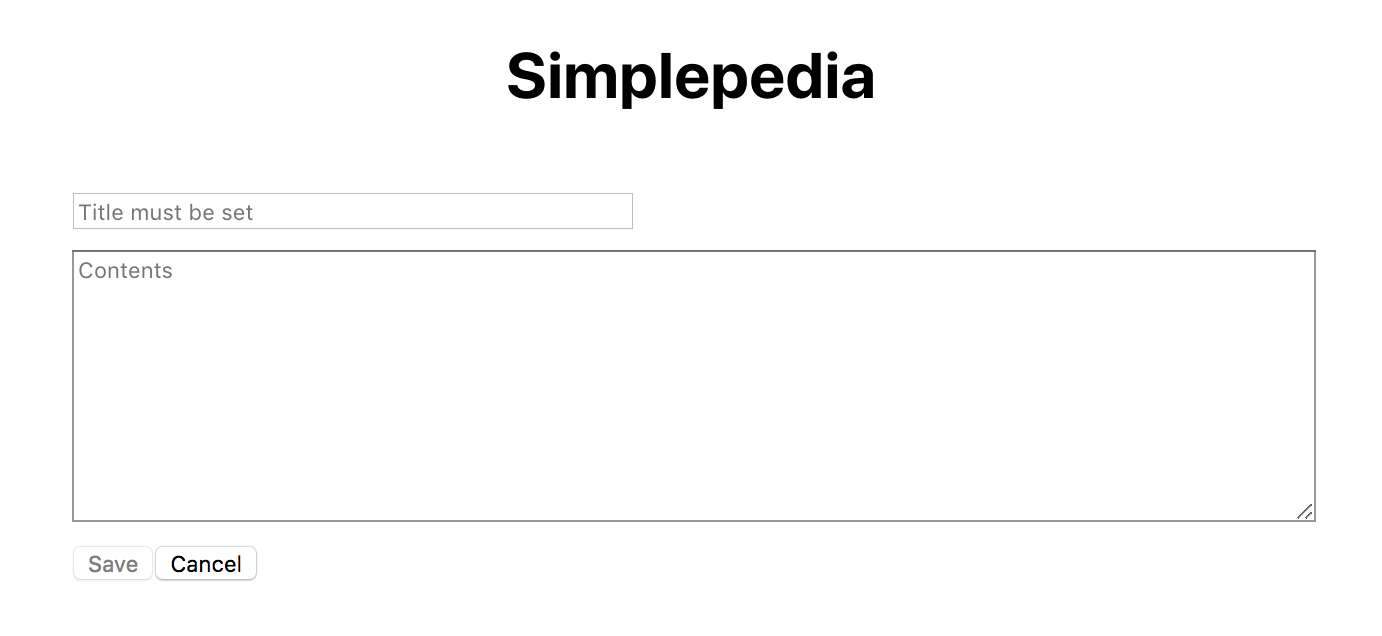
Your component should use an <input> of type "text" to allow the user to enter in a new title and a <textarea> to allow the user to write the body of the article. Your component should have two buttons. The first should be a "Save" button. When the user clicks it, the article should be saved, and editing should be completed (your editor styling does not need to match the example above). The date on the article should be set to the current date and time (as an ISOString via Date.toISOString()), and the article should be added to the collection. The second should be a "Cancel" button. When the user clicks cancel, the edit should be discarded and the primary interface should be restored. Keep in mind the newly created article might not belong to an existing section.
There is one form validation required. If the title is not set, you should not let the user save the article by disabling the "Save" button. To help the user, provide meaningful initial placeholder text in both input elements.
Recall that we use [controlled components]. Store the state of the values you are getting from the user and use value and onChange to keep the inputs in sync with the state (see the ColorPicker example). I do not want to see you reaching into the DOM for the values with document.getElementById().
Routing to the editor
Just as we are now using routing to switch between articles, we would like to use routing to switch to the editor. Specifically, http://localhost:3000/editor should bring up a blank editor, and http://localhost:3000/editor/42 should allow us to edit articles number 42 (you'll get to that in a moment).
Create a new page in pages called editor/[[...id]].js (that is a directory called editor with a file called [[...id]] inside it). More specific routes take precedence, so this route will win when "editor" is present in the route.
Inside, create a new component called SimplepediaEditor (the name is important -- the tests are expecting it). You can basically copy the contents of the Simplepedia component, except that you will add your new Editor component instead of IndexBar and Article (i.e., it should retain the collection prop, the new currentArticle and setArticle and the basic layout of the returned DOM).
Update the collection
Your Editor component expects a complete callback. You will write it in SimplepediaEditor. Add another prop to SimplepediaEditor called setCollection. This has already been hooked up for you in _app.js and will update the collection if you pass it a new array.
The callback should check if there is an article. If there is, add it to the collection (remember that you can't just push it on the end, you need a new array -- consult the notes for a good pattern for updates like this). Before you add it to the collection, you will need to give it an id. Scan through the collection to find the largest id, and give your new article an id that is one more than that.
Once the article is added, you should visit the new article. Use router.push to view it.
If the article argument is missing (undefined), then the user canceled. You can call router.back() to return to the viewer.
Part 4: Add some buttons
The Simplepedia component will be responsible for switching between adding and viewing.
Create a new component called ButtonBar. It should display a single button called "Add".
The component will take a single callback prop called handleClick. When the button is clicked, the component should call the function, passing "add" as an argument (i.e., handleClick('add')).
Add this new component to Simplepedia underneath the Article component.
Write the handleClick callback so that when it receives the command "add", it uses the router to take us to the editor.
Part 5: Updating IndexBar
We would like IndexBar to be consistent with the current article (i.e., display the correct section). There are a couple of ways to ensure this. I would like you to share currentArticle with IndexBar as a new prop. Unfortunately, you can't just use the first character of the title to determine the section, because then we couldn't switch sections. Instead, I would like you to add an effect hook. We will discuss useEffect in lecture shortly.
The basic concept is that we register a function to be called under certain circumstances (when state or prop values change). The useEffect() function takes two arguments, the first is the function to run and the second is the list of variables to watch. You will want to watch for changes to the current article, changing the section if appropriate. This will mean that the section will change when the article changes, but can then be also changed independently when the user selects a new section.
It is possible for the user to create a new article with the same title as a current article. We will ignore that problem in this assignment as we will fix it in the next assignment when we introduce a server (which will validate that the title is unique).

Part 6: Allow editing
Once you can successfully add new articles, you will adapt the interface to allow editing of articles. Add an "Edit" button to the ButtonBar to request the current article be edited. When clicked, the edit button should call handleClick with the string "edit".
When handleClick receives "edit", you should route to /editor/X, where X is the id of the article to be edited. This should look the same as adding an article, except that the title and contents should already be filled in in the Editor.
To do, this, add a second optional prop called article to Editor. The SimplepediaEditor should set this value with the currentArticle value it reads from the route (when creating a new article, this prop should remain undefined).
On "Save", the date should be updated and the changes saved (and the newly edited article displayed). On "Cancel", the changes should be discarded leaving the article unmodified and the previous article view should be restored (displaying the original, unedited, article).
Part 7: Improve the UI
I would also like you to improve the user experience (UX) of the website.
One principle in UX design is to not allow the user to perform actions when the actions don't make sense. We have already done this in Editor, where the "Save" button isn't enabled unless the user has added a title. The user also shouldn't be able to edit if there isn't a current article. Add another prop to ButtonBar called allowEdit. When True, the "Edit" button should be visible. When False, it shouldn't be visible.
Reflection
In the README.md file, I would like you to write a brief reflection about your assignment.
If it meets the requirements (passes all of the automated checks), write how comfortable with your solution. Did you use good development practices, or is it a hacky, last minute solution. Do you understand your own solution? How much effort did you put into it? Do you feel like you could do a similar assignment with more ease?
If it doesn't yet meet the requirements, what are you struggling with? What does it not do correctly? What have you done to try to correct it? How hard have you tried to correct it? How much effort have you put into the entire assignment?
Put a date on the reflection and if you do any revisions, add another dated reflection below it.
Finishing up
Your submission should not have ESLint warnings or errors when run with npm run lint (or npx eslint .). Remember than you can fix many errors automatically with npm run lint -- --fix (although since ESLint can sometimes introduce errors during this process, we suggest committing your before running "fix" so you can rollback any changes). As described in the README, the assignment skeleton includes the Prettier package and associated hooks to automatically reformat your code to a consistent standard when you commit. Thus do not be surprised if your code looks slightly different after a commit.
Submit your assignment by pushing your changes to GitHub via git push --all origin and then submitting your repository to Gradescope. You can submit (push to GitHub and submit to Gradescope) multiple times. Portions of your assignment will undergo automated assessment. Make sure to follow the specifications exactly, otherwise the tests will fail (even if your code generally works as intended). Use the provided test suite (run with npm test) to get immediate feedback on whether your code follows the specification. Because of the increased complexity of a React application, Gradescope can take minutes to run all of the tests. Thus you will be more efficient testing locally and only submitting to Gradescope when you are confident your application meets the specification.
Advice
You will go astray if you worry too much about the flow of interactions through your application. While information flow is important, focusing on it will have you attempting to code everything linearly. Practice compartmentalization and trusting that other components will work. You should also remember that as you write React components, the primary question should be "given the current state and props, what should I render?"
FAQ
Do I need to implement unit testing?
We will learn later in the semester how to unit test React components. For this assignment you are not expected to implement any of your own unit tests. The skeleton includes some unit tests to assist you in your development and to ensure that the grading scripts can automatically test your submission.
What if the tests and assignment specification appear to be in conflict?
Please post to Slack so that we can resolve any conflict or confusion ASAP.
Last updated 11/01/2021